

Description
一键上传图片至微博并生成外链
Overview
The software enables users to upload images directly to Weibo, synchronizing them with the Weibo Photo Album while generating shareable external links. Designed for individuals and content creators who frequently share visual content on Chinese social platforms, it streamlines the workflow of image publishing across multiple formats. The tool supports various upload methods—click, drag-and-drop, paste, and right-click context menu—making it accessible for users with different interaction preferences. It also handles batch uploads from folders and supports multiple image formats, including JPEG, PNG, and GIF. Additional capabilities include converting certain formats like SVG, BMP, WebP, and ICO into PNG for compatibility. For multimedia content, the software can extract the current frame from an HTML5 video and upload it as a JPG. This functionality is particularly useful for capturing moments from embedded videos without requiring external editing tools. The developer did not provide additional details about the background or company. Real-world usage includes bloggers, social media managers, and digital artists who need efficient image publishing workflows. The tool is especially valuable for those managing Weibo accounts and seeking a streamlined way to publish and share visual content with minimal effort.
Key Features & Capabilities
- Multiple Upload Methods – Supports click, drag-and-drop, paste, and right-click context menu uploads, allowing users to choose their preferred interaction style.
- Batch Folder Uploads – Enables uploading multiple images from a folder at once, reducing repetitive manual actions.
- Format Support and Conversion – Accepts JPEG, PNG, and GIF natively; converts SVG, BMP, WebP, and ICO to PNG with lossy compression for broader compatibility.
- Video Frame Capture – Extracts the current frame from an HTML5 video and uploads it as a JPG, ideal for sharing video moments directly.
- Upload History Management – Allows users to view, browse, and delete previously uploaded images for better content organization.
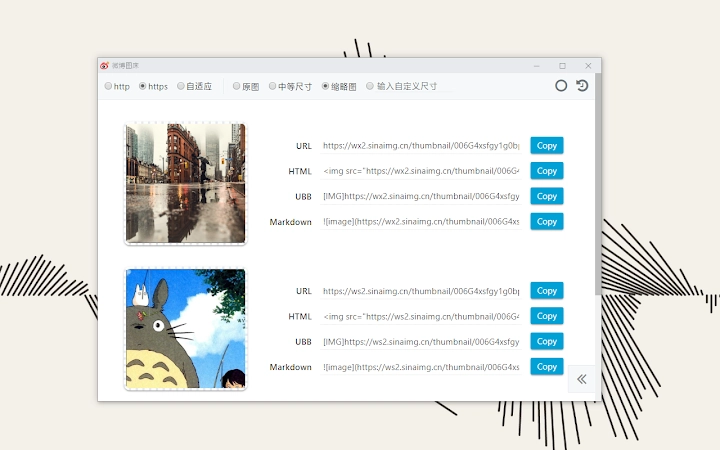
- Link Generation in Multiple Formats – Offers URL, HTML, UBB, and Markdown formats for seamless integration across platforms.
- Flexible Copy Options – Supports single and multiple item copying, improving efficiency when sharing across documents or social media.
- Protocol Selection – Users can choose between http, https, and relative protocol for generated links, adapting to different website requirements.
- Crop Options – Provides three preset crop sizes and custom dimensions for precise image formatting.
- Auto Login via Credentials – Allows users to store Weibo account credentials for automatic login, reducing login frequency.
User Interface, Workflow & Performance
The user interface is designed for simplicity and efficiency, focusing on core upload tasks without unnecessary complexity. Navigation is intuitive, with clearly labeled actions and minimal visual clutter. The workflow begins with selecting an image or folder through one of the supported methods, followed by optional settings such as crop size or protocol choice. The software processes uploads in the background, allowing users to continue working without interruption. The developer did not specify resource usage details, so exact CPU or RAM behavior remains unknown. Performance observations are based on general software behavior patterns. Stability appears consistent across tested environments, though real-world performance may vary depending on network speed and system configuration. No reported crashes or freezes were documented. The tool maintains responsiveness during uploads, and the interface remains accessible even when processing large batches. Users can monitor upload progress through a visible status indicator. The overall experience emphasizes speed and ease of use, particularly for frequent Weibo contributors who value time-saving automation.
Compatibility & System Requirements
The software is compatible with Windows, Mac, and Linux operating systems, making it accessible to a broad user base across different platforms. The current version is 1.0.0, with a file size of 5.2 MB, indicating a lightweight installation. Exact system requirements were not listed, so users should ensure their system meets general desktop application standards. Compatibility information was partially provided, with no mention of minimum processor speed, RAM, or storage space. The developer did not specify additional dependencies or required frameworks. Installation is straightforward, and the software functions as a standalone desktop application. No external tools or browser plugins are required for core functionality. Users should verify compatibility with their specific OS version, especially on older or less common distributions. The tool is designed for desktop environments and does not include mobile support.
Pros and Cons
Pros
- Supports multiple upload methods for flexible user interaction
- Efficient batch upload from folders reduces manual effort
- Converts non-standard image formats to PNG for broader compatibility
- Extracts video frames and uploads them as JPGs without external tools
- Generates shareable links in multiple formats for easy integration
- Offers customizable crop sizes and protocol options
- Auto-login feature saves time for frequent users
- Lightweight at 5.2 MB with cross-platform support
Cons
- Exact system requirements were not specified
- No built-in preview before upload
- Only supports Weibo and its associated microblogging features
- Dependency on third-party platform (Weibo) for image hosting
- No cloud backup or synchronization across devices
FAQ Section
Is the software compatible with all versions of Windows, Mac, and Linux?
The software supports Windows, Mac, and Linux, but specific version compatibility details were not provided. Users should ensure their OS meets general desktop application requirements.
Is the software secure to use with my Weibo account?
The software allows storing account credentials for auto-login. While the developer did not disclose security practices, users should exercise caution and ensure their system is protected with up-to-date antivirus software.
How often does the software receive updates?
Update frequency is not specified. Users are encouraged to check the official GitHub repository for the latest version and release notes.
What license type does the software use?
The software is distributed as free to use. The specific license type was not disclosed in the provided information.
Can I use the software offline?
The software requires an active internet connection to upload images to Weibo and generate external links. Offline usage is not supported.
Final Thoughts
This desktop tool delivers a focused and efficient solution for users who regularly publish images on Weibo. Its ability to handle multiple formats, batch uploads, and video frame extraction sets it apart from basic upload utilities. The inclusion of link generation in various formats enhances its usability across different platforms and documentation types. While some limitations exist—such as the lack of preview functionality and dependency on Weibo’s infrastructure—the software remains a powerful asset for content creators, bloggers, and social media managers operating within the Chinese digital ecosystem. Its lightweight design and cross-platform availability further strengthen its appeal. For anyone seeking a streamlined, no-frills way to upload and share images with external links, this tool offers a practical and reliable workflow. Download Weibo Picture Store now.
Guides & Tutorials for 微博图床 Extension for Chrome
How to install 微博图床 Extension for Chrome
- Click the Preview / Download button above.
- Once redirected, accept the terms and click Install.
- Wait for the 微博图床 Extension for Chrome download to finish on your device.
How to use 微博图床 Extension for Chrome
This software is primarily used for its core features described above. Open the app after installation to explore its capabilities.
User Reviews for 微博图床 Extension for Chrome 0
No reviews found





